
Building a Calculator with Microservices (FastAPI + React)

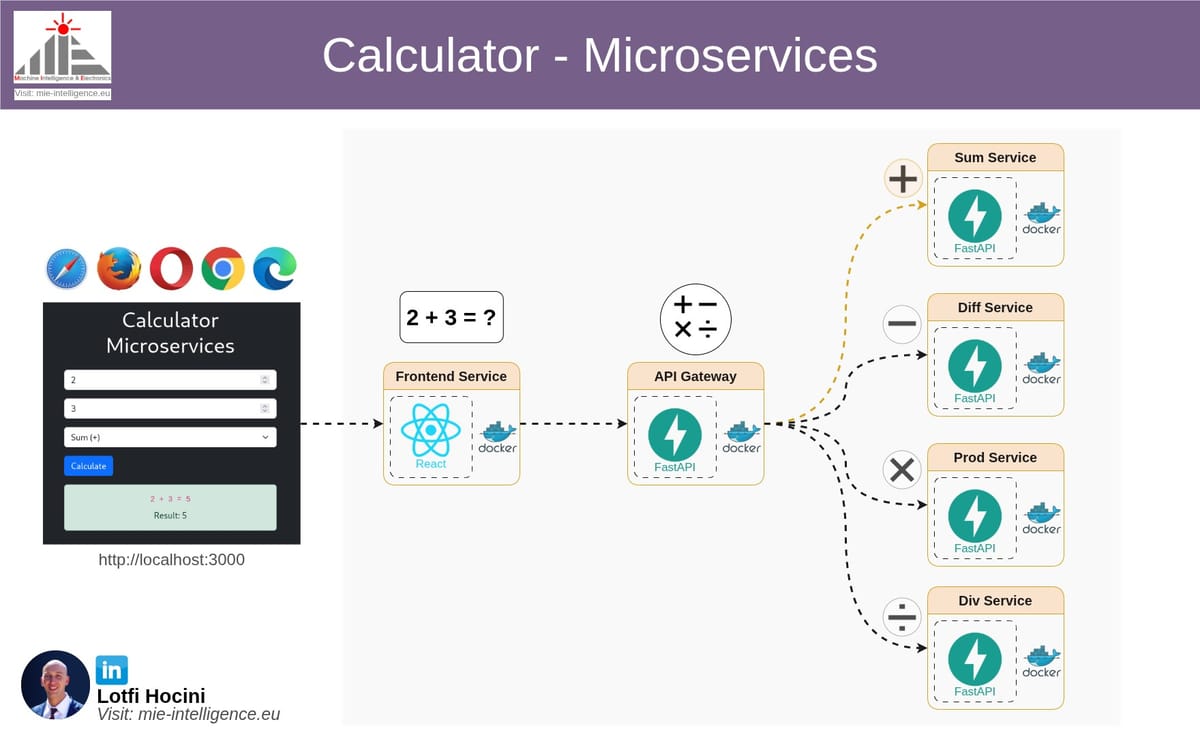
In this post, I'll walk through a compact but practical example: a calculator built as microservices. The idea is simple: split each arithmetic operation into its own service so they can be developed, deployed, and scaled independently. We'll use FastAPI for the backend services and gateway, and React for the frontend UI.
Why microservices for a calculator?
This project isn't about performance — it's about demonstrating core microservice principles on a tiny, easy-to-understand problem:
- clear service boundaries (sum, difference, product, division)
- a routing gateway that mediates requests
- an independent frontend that talks only to the gateway
- containerized services for easy orchestration with Docker Compose
Architecture overview
- gateway: FastAPI service exposing a single
/calculateendpoint. It forwards requests to operation-specific services. - sum_service, diff_service, prod_service, div_service: each is a FastAPI microservice exposing one endpoint and returning
{ result: number }. - frontend: React app that lets users input two numbers and choose an operation.
- Simplified Diagram (complete diagram illustrated in the top image) :
Frontend (3000) → Gateway (8000) → Operation services (internal)
Project structure
The repository layout (top-level files and folders):
calculatore-microservices
├── sum_service
│   ├── Dockerfile
│   └── main.py
├── diff_service
│   ├── Dockerfile
│   └── main.py
├── prod_service
│   ├── Dockerfile
│   └── main.py
├── div_service
│   ├── Dockerfile
│   └── main.py
├── gateway
│   ├── Dockerfile
│   └── main.py
├── frontend
│   ├── Dockerfile
│   ├── package.json
│   ├── public
│   │   └── index.html
│   └── src
│       ├── App.jsx
│       ├── index.css
│       └── index.jsx
└── docker-compose.yml
Services & Endpoints
- Gateway
- POST /calculate
- Request body:
{ "a": number, "b": number, "operation": string } - Supported operations:
sum,diff,prod,div
- Sum service
- POST /sum
- Body:
{ "a": number, "b": number } - Response:
{ "result": a + b }
- Diff service
- POST /diff
- Body:
{ "a": number, "b": number } - Response:
{ "result": a - b }
- Prod service
- POST /prod
- Body:
{ "a": number, "b": number } - Response:
{ "result": a * b }
- Div service
- POST /div
- Body:
{ "a": number, "b": number } - Response:
{ "result": a / b } - On division by zero returns
HTTP 400with detail message.
Key implementation points
- The gateway uses
httpx.AsyncClient(httpx) to forward requests to services. Service hostnames used inside Docker are the service names fromdocker-compose.yml(for examplehttp://sum-service:8000/sum). - Each microservice validates inputs with Pydantic models. Decimal-like types (
condecimal or float) are used in the services to handle numeric input. - The React frontend uses Axios and calls
http://localhost:8000/calculatewhen running locally. It maps UI-friendly operation names (sum,difference,product,division) to the service operation names.
Gateway: Routing example
from fastapi import FastAPI, HTTPException
from pydantic import BaseModel
import httpx

app = FastAPI()

SERVICES = {
    "sum": "http://sum-service:8000/sum",
    "diff": "http://diff-service:8000/diff",
    "prod": "http://prod-service:8000/prod",
    "div": "http://div-service:8000/div",
}

class CalculationRequest(BaseModel):
    a: float
    b: float
    operation: str

@app.post("/calculate")
async def calculate(request: CalculationRequest):
    operation = request.operation.lower()
    if operation not in SERVICES:
        raise HTTPException(status_code=400, detail="Unsupported operation")

    service_url = SERVICES[operation]
    async with httpx.AsyncClient() as client:
        response = await client.post(service_url, json=request.dict())
        response.raise_for_status()
        return response.json()
Gateway Service
Division service example
from fastapi import FastAPI, HTTPException
from pydantic import BaseModel, condecimal

app = FastAPI()

class Numbers(BaseModel):
    a: condecimal()
    b: condecimal()

@app.post("/div")
def div_numbers(numbers: Numbers):
    if numbers.b == 0:
        raise HTTPException(status_code=400, detail="Division by zero not allowed")
    return {"result": numbers.a / numbers.b}
Division Service
Frontend: calling the gateway
axios.post('http://localhost:8000/calculate', {
  a: parseFloat(a),
  b: parseFloat(b),
  operation: 'sum'
}).then(res => console.log(res.data))
  .catch(err => console.error(err))
Frontend Service Calling Gateway
Run locally with Docker Compose
Make sure Docker and docker-compose are installed on your machine. From the repository root, using your terminal, you can start everything with docker-compose:
docker compose up --buildThis will:
- Build and run the gateway on port
8000(exposed to the host).- Build and run the frontend on port3000(exposed to the host). - Start the four operation services (not directly exposed to the host; the gateway calls them by service name).
Open the frontend in your browser at: http://localhost:3000
Or call the gateway directly (e.g., with curl):
curl -X POST http://localhost:8000/calculate \
  -H "Content-Type: application/json" \
  -d '{"a":5, "b":2, "operation":"prod"}'
Repository
You can find the complete source code for this project on GitHub: calculator-microservices
License
This project is provided as-is for demo and learning purposes.
